Stopping Spam and Bots on Your Forms
Every IndieMade shop has four forms that bots like to find: the login form, the account registration form, the password reset form and your contact form. The Spam and Bot Prevention settings let you choose the protection on each one, and close the registration page or the contact form altogether if spam keeps getting through. These settings are on every plan.
Where to find it
Click IndieMade Settings at the top right of your Dashboard and choose Spam.
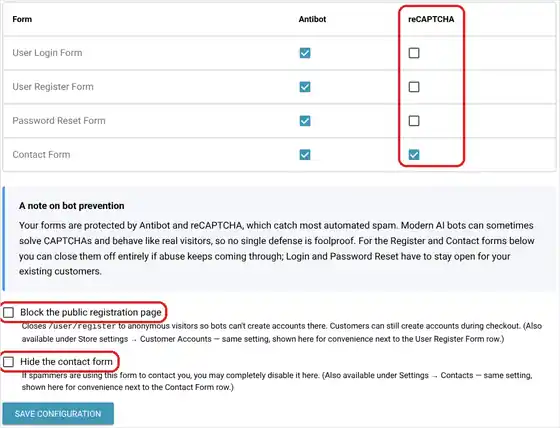
Antibot and reCAPTCHA
The table lists each form with two kinds of protection:
- Antibot works quietly in the background. Real visitors never see it. It stops most simple spam programs. Leave it ticked on every form.
- reCAPTCHA is Google's check that a visitor is a person. Most people pass without noticing; now and then someone is asked to tick a box or pick some pictures. Tick it on a form when Antibot alone is not enough.
Click Save configuration after you change anything.
When spam still gets through
No protection stops every bot. Some modern bots can solve picture puzzles and act like real visitors. If one form keeps getting abused, you can close it:
- Block the public registration page closes the stand-alone sign-up page (/user/register) so bots cannot make fake accounts there. Shoppers can still create an account while they check out. The same switch is in Store Settings under Customer Accounts.
- Hide the contact form closes your whole Contact page. The Contact links in your menus disappear, and anyone who opens the old address sees an Access denied message. If you have typed a link to your contact page into another page, such as your About page, take it out or change it to your email address. You can also turn this on from the contact page settings; see How to use your IndieMade contact form.
The login and password reset forms cannot be closed, because your customers need them to get into their accounts.
Tips
- Start with Antibot on every form and reCAPTCHA on the contact form. Add reCAPTCHA to another form only when spam shows up there.
- If you get a run of junk messages, delete them from Dashboard → Contacts and tick reCAPTCHA on the contact form before you think about hiding it.
- A burst of new accounts with odd names usually means bots found your registration page. Block the public registration page; real customers can still sign up at checkout.
Questions? Email support@indiemade.com.