How Do I Log In to My IndieMade Website?
You sign in to your IndieMade site on the site itself, with the email address you signed up with. Once you are in, you land on your Dashboard.
Signing in
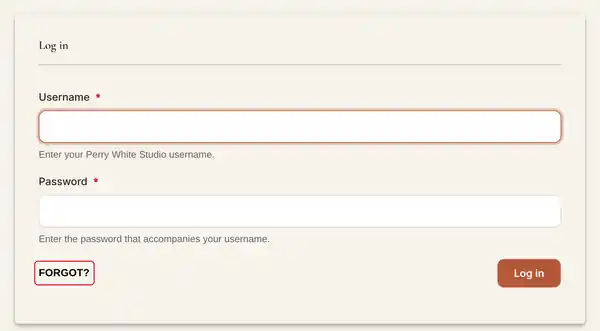
- Go to your site and scroll to the footer. Click Log in. You can also type your site's address followed by /user/login, for example yourshop.indiemade.com/user/login.
- In Username, type the email address you signed up with. Your username works too, if you know it.
- Type your Password and click Log in.

Forgot your password?
- On the sign-in page, click Forgot?
- Type the email address you signed up with and send the form.
- Open the email from your site and click the link in it. It signs you in once and opens your account, where you type a new password and save.
No email? Check your spam folder, and make sure you typed the address you signed up with. Account emails like this one always go to that address, even while a new shop is on its free trial.
Don't remember your site's address?
Go to account.indiemade.com and use Email me my site links. Type the email you signed up with and we send you the links to every site you have with IndieMade.
Signed in but no toolbar?
The toolbar along the bottom of your site only shows in the browser where you signed in. If you use a custom domain and do not see it, sign in again on the address you are looking at.
Your plan, payments and domain
These are in your Dashboard under IndieMade Settings: Plan & Billing for your plan and payment method, and, on shops that have it, Custom Domain for your own web address. See Your Account: Email, Password and Plan and Setting up a Custom Domain.
Still stuck? Email support@indiemade.com from the address you signed up with and we will help you in.