Getting More Reviews
Most happy customers never think to write a review. They aren't withholding it — they just moved on with their day. IndieMade gives you three ways to ask, and asking is nearly all of it.
1. Automatic reminders after an order
Go to Reviews → Settings and find Scheduled reminders. Tick Enable scheduled reminders and IndieMade emails each customer once, on its own, after their order is done.
- Trigger reminder when — choose Order is marked completed or Order is marked shipped. Pick whichever step in your workflow actually means the customer has the item in hand. If you never mark orders completed, choose shipped.
- Delay (days) — how long to wait before sending. The default is 7 days, which gives the package time to arrive and the customer time to enjoy it.
- Link expiry (days) — how long the review link in that email stays valid. Default is 30 days.
- Email subject — defaults to How did you like your order from [store_name]?
Writing the ask
The Review page section controls the words the customer actually reads — both in the email and on the page they land on after clicking. Three fields, all yours to change:
- Greeting — default A small favor, [customer_name]
- Headline — default How did your order turn out?
- Body — default Your words help future buyers and mean the world to a small studio. Take a minute when you have one. No rush.
You can use any of these placeholders in the subject, greeting, headline or body, and they'll be filled in for each customer:
[customer_name] | The customer's first name. |
[store_name] | Your store's name. |
[site_name] | Your site's name. |
[order_number] | The order number. |
[order_date] | The date of the order. |
[product_list] | The items from that order. |
[review_link] | Their personal review link. |
A few parts of the email are fixed: the button reads Write your review, the item list is headed Products from your order:, and the email is sent from your site's email address.
2. Asking one customer, by hand
You don't need reminders switched on to ask someone directly. In your orders list, the operations menu on any order has Send Review, which sends that customer their review link right away.
3. The review invite link, for newsletters
In Reviews → Settings, the Review invite link section gives you a link with a copy button beside it. Put it in your newsletter, a thank-you card, your Instagram bio — anywhere.
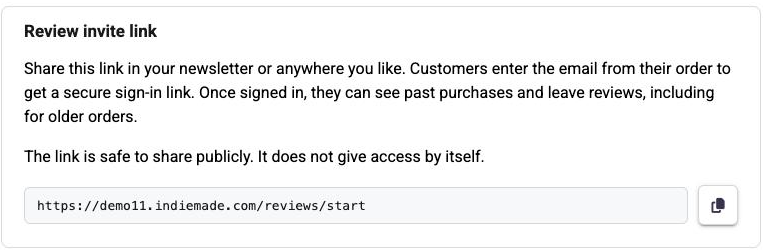
The page it opens says Leave a review and asks for one thing: the email address from their order. IndieMade emails them a secure link back. Once they're in, they can see everything they've ever bought from you and review any of it, including orders from long before you turned reviews on.
The link is safe to post publicly. It doesn't grant access by itself — it only asks for an email address, and an address with no completed orders behind it gets nowhere. The sign-in and account-setup links it sends are good for 24 hours.
Watching the queue
The Scheduled Reminders tab shows every reminder IndieMade is tracking, with counts across the top for Total, Scheduled, Sent, and All Reviewed, and tabs to filter to any one of them.
Each row shows the order, the customer, when the order completed, how many of its items have been reviewed, and a status badge:
- Sends Mar 14 — queued, with the date it will go out.
- Ready to Send — the delay has passed; it goes out on the next run.
- Sent — already emailed.
- All Reviewed — this customer has reviewed everything in the order.
Two buttons sit at the end of each row: send to send that reminder now instead of waiting, and delete to cancel it. Deleting stops the scheduled email and removes the tracking row.
The send button works even when automatic reminders are switched off — the page will tell you they're off and point you at Settings, but you can still reach out to any individual customer from here.
A note on asking well
Ask once. IndieMade sends a single reminder per order, never a drip campaign. That restraint is deliberate: the shops with the best reviews are the ones customers don't feel harassed by.